 Accountant
User manual
Accountant
User manual
Savings goals
Save toward a target, with progress taken from your real account balances.
What you'll do: create a goal, such as an emergency fund or a trip, and link the accounts you're saving in. Progress is never typed in by hand. It always follows the balances of the linked accounts, so every deposit or withdrawal you record updates the goal.
Create a goal
- Open Savings goals (on phones, More › Savings goals). You can also tap the Savings goals card on Home.
- Tap Create goal, or New goal if you already have one.
- Fill in:
- Name, for example Emergency fund
- Target amount
- Target date (optional). It enables the monthly figure, the pace status and deadline reminders.
- Color and Note (optional)
- Tap Link accounts and pick the asset accounts you're saving in. Only active asset accounts can be linked.
- Leave Milestone notifications on to be told at 25%, 50%, 75% and 100%, and when you fall behind close to the target date.
- Tap Save.
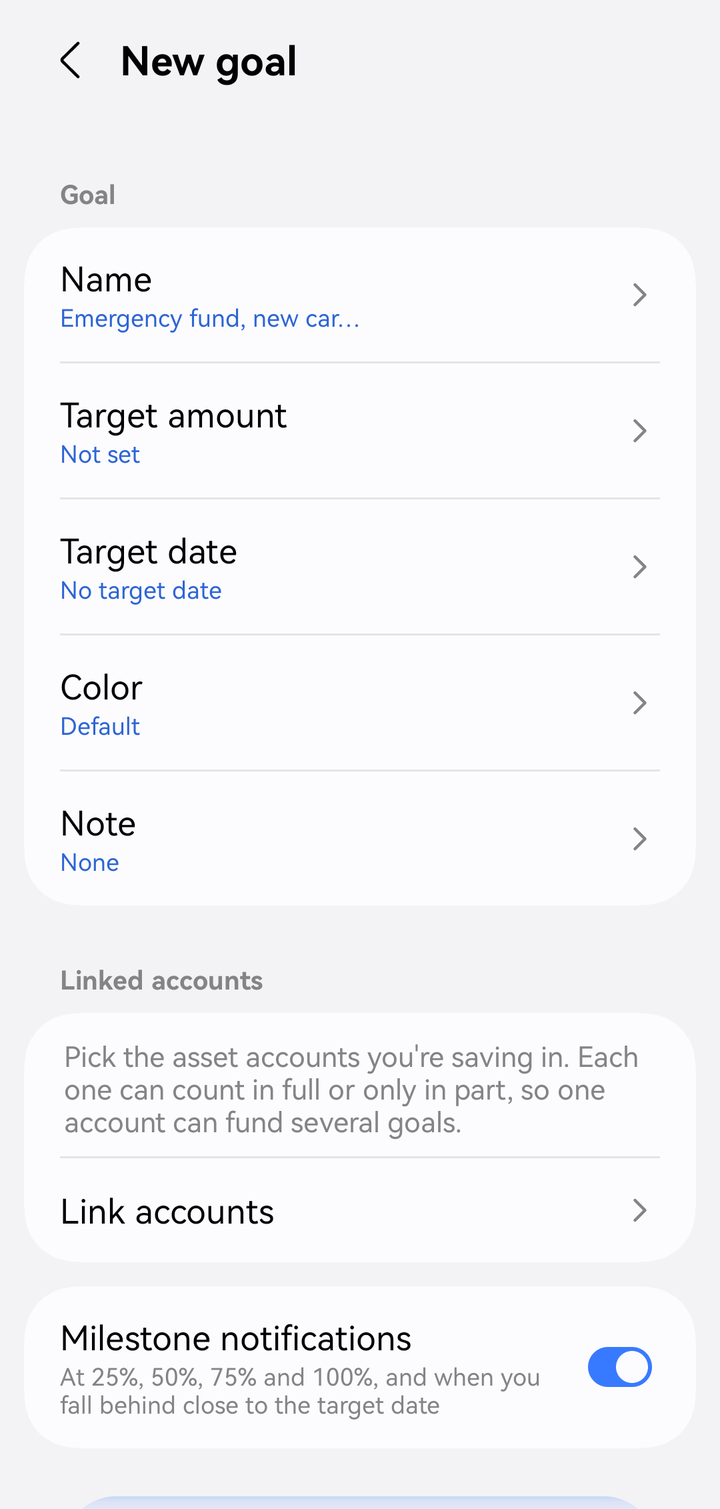
Creating a savings goal
How much of an account counts
Tap a linked account to choose how much of its balance counts toward the goal:
- Full balance: everything in the account, or whatever is left after other goals take their share.
- Fixed amount: up to a set amount, in the account's own currency.
- Percentage of balance: a share of the balance, from 1 to 100%.
This lets one account fund several goals without counting the money twice.
Example. A bank account holds ₱10,000.
| Goal | Setting | Counts |
|---|---|---|
| Trip | Fixed amount ₱3,000 | ₱3,000 |
| Gadget | 20% of balance | ₱2,000 |
| Emergency fund | Full balance | ₱5,000 (what's left) |
If the fixed amounts and percentages add up to more than the account holds, those goals are scaled down proportionally and a warning appears: "Goals claim more than this account holds, so their shares are reduced proportionally." An overdrawn account counts as 0.
Reading progress
The goal's screen shows Saved, Still to save, and a status:
| Status | Meaning |
|---|---|
| Achieved | You've reached the target. |
| Ahead of schedule | Your recent monthly pace is at least 10% above what's needed. |
| On track | Your recent pace meets what's needed. |
| Behind schedule | Your recent pace is below what's needed. |
| Target date passed | The date is over and the target wasn't reached. |
| No target date | Progress is tracked, but there's no pace to judge. |
| Not enough history yet | Less than a month of data so far. |
It also shows Needed per month, Average saved per month lately (over the last 3 months), Expected to reach, and a progress chart for the last 12 months. The chart is an estimate, because it applies the goal's current links to past balances.
Where else goals appear
- Home: the Savings goals card shows up to 3 active goals.
- Account transactions: for an asset account, a Saving for row lists every goal the account funds.
Currencies
A goal has one currency. Linked accounts in other currencies are converted with their latest exchange rates. If a rate is missing, that account is left out and the goal shows a note.
Edit or delete
Open the goal and use ⋮. Deleting a goal never changes your accounts or transactions. If a linked account is deleted or deactivated, it shows as Account unavailable and counts as 0.