 Accountant
User manual
Accountant
User manual
Setting up accounts
Add your cash, bank accounts, cards, loans, income and expense accounts.
What you'll do: add your real-world accounts with their current balances, so Accountant starts from where you are today.
How your accounts are organized
Think of a filing cabinet. Your account structure has three levels, from the broadest to the most specific:
- Account type: the drawer. There are only four, and every account belongs to one of them:
- Asset: what you own, such as cash, bank balances, and money others owe you
- Liability: what you owe, such as credit cards and loans
- Income: what you earn, such as salary and interest
- Expense: what you spend on, such as food, rent and bills
- Account category: a folder inside the drawer. It groups similar accounts, so a long list stays tidy.
- Account: the actual record inside the folder. This is where amounts go. Every transaction moves money into or out of accounts, and each account keeps its own balance.
Here's how part of the demo ledger looks:
Asset (account type)
├── Cash on hand (category)
│   ├── Wallet (account)
│   └── Pocket cash (account)
└── Cash in bank (category)
    ├── Everyday checking (account)
    └── Emergency savings (account)

Expense (account type)
├── Household (category)
│   ├── Groceries (account)
│   └── Apartment rent (account)
└── Utilities (category)
    ├── Electricity (account)
    └── Home internet (account)
On the Accounts screen, the four tabs (Assets, Liabilities, Income and Expenses) are the account types. Each heading inside a tab, such as Cash on hand, is a category, and the rows under it are your accounts.
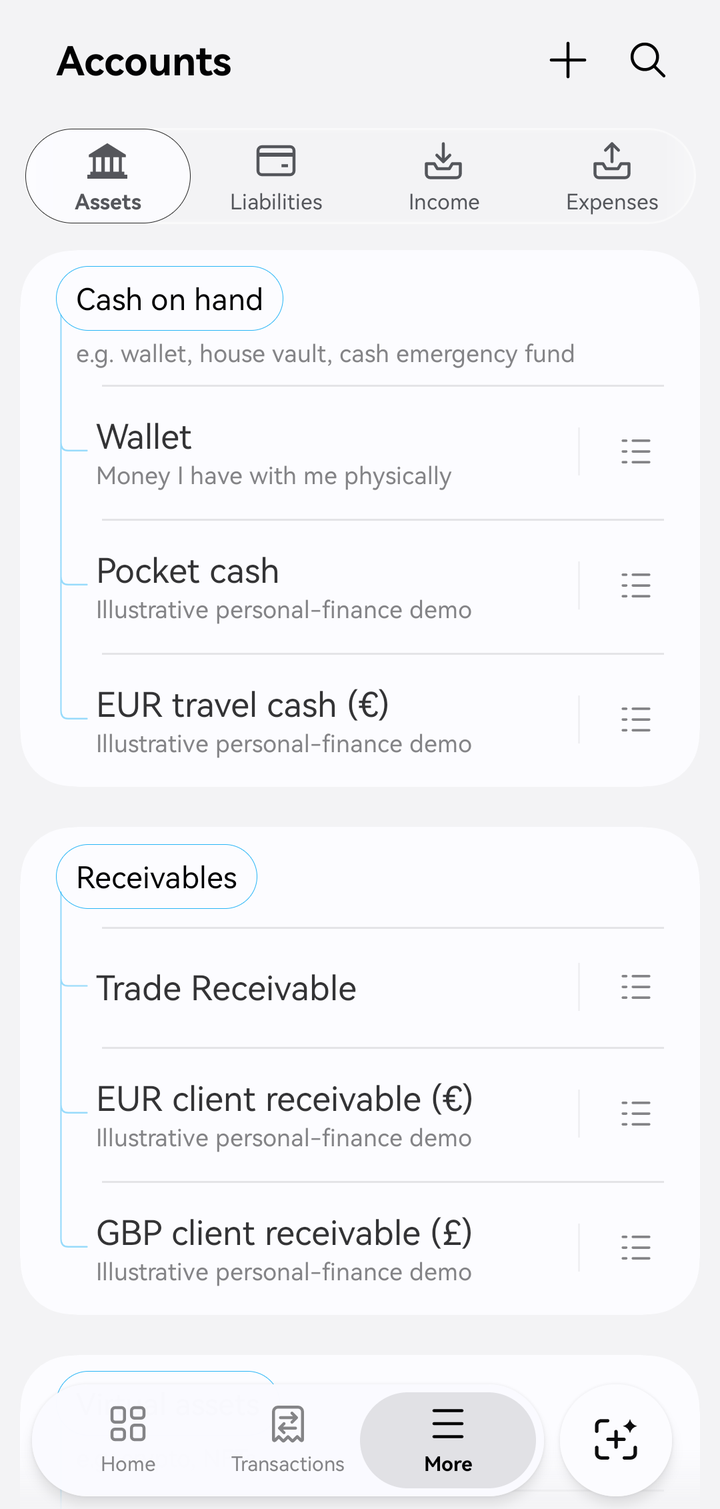
The Assets tab: the "Cash on hand" category and its accounts
In Accountant, a category is not an account.
Many money apps use the word "category" for the things you spend on, like Groceries or Rent. In Accountant, Groceries and Rent are expense accounts. They're where your spending is recorded, and you can give each one a budget.
A category is only the folder that groups accounts together, such as Household holding Groceries and Rent. You never record money in a category; you record it in an account. And categories aren't just for expenses: every account type has them. Cash in bank groups your bank accounts, and Credit card groups your cards.
Why only four account types? See the basic accounting equation.
The categories you start with
| Account type | Default categories |
|---|---|
| Asset | Cash on hand, Receivables, Cash in bank, E-wallet, Investments, Real estate, Virtual assets |
| Liability | Credit card, Payables, Mortgage loan, Other loans, Other liabilities |
| Income | Investment income, Business income, Work |
| Expense | Car, Subscriptions, Household, Utilities, Finance charges |
You can rename these or add your own. See Account categories.
Add an account
- Open Accounts (on phones, More › Accounts) and tap +.
- Choose the Account type: Asset, Liability, Expense or Income.
- Enter the Account name, for example Everyday checking, and optionally an Account description.
- Tap Category and choose the group it belongs in, such as Cash in bank.
- For assets and liabilities, choose the Currency if it isn't your reporting currency. See Multi-currency.
- Turn on Cash account for cash, bank and e-wallet accounts. See below.
- Turn on Opening balance to enter what the account holds (or owes) today, and the Opening balance date.
- Tap Save.
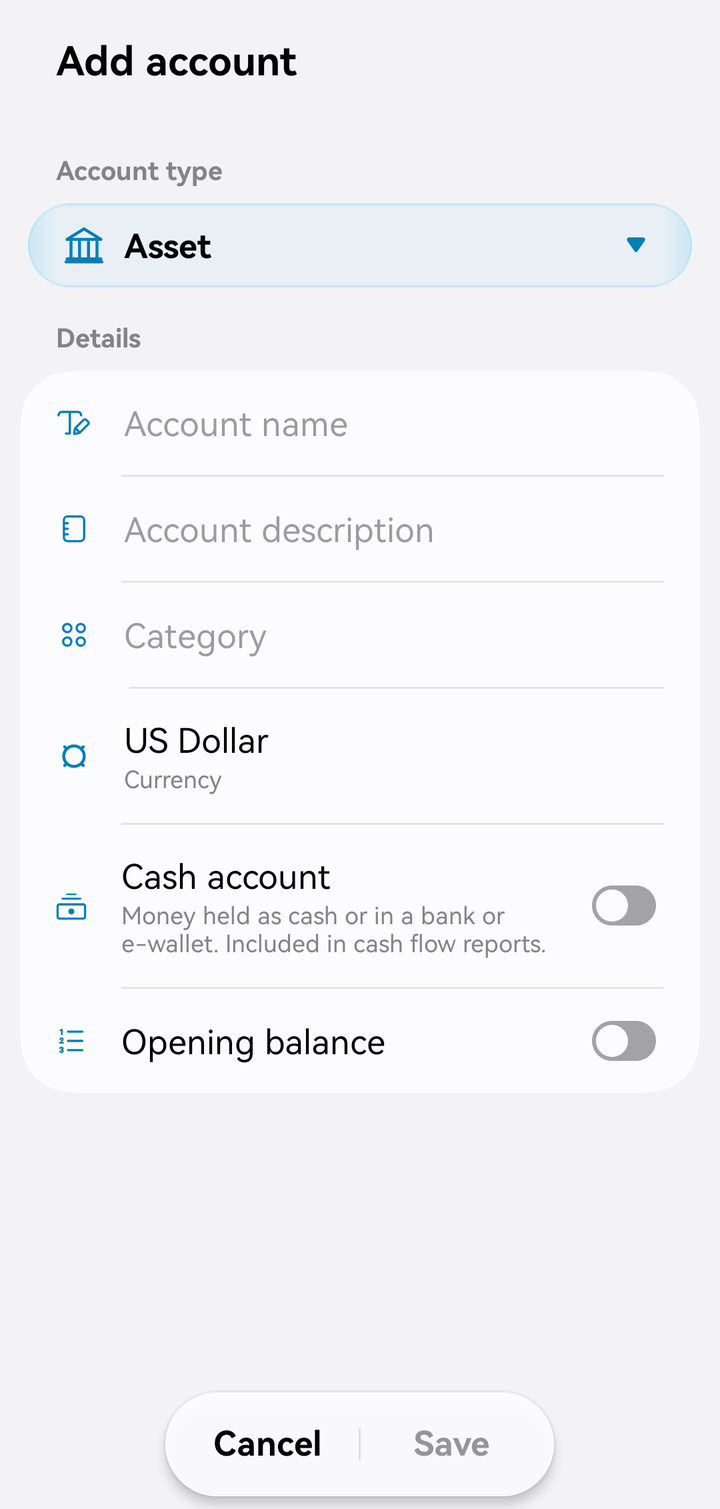
Adding an asset account
Cash accounts
Cash account marks money you can spend directly: "Money held as cash or in a bank or e-wallet. Included in cash flow reports."
- Only cash accounts can be used for Pay from, Deposit into and Transfer money.
- The Cash flow report and the Cash balance widget count only cash accounts.
Leave it off for investments, property, receivables, cards and loans.
Opening balances
An opening balance is money or debt you already had before you started using Accountant. It's not income or an expense. Use today's balance, or your balance on the first day you plan to record transactions from.
Loans and credit cards: enter what you owe now as the opening balance of the liability account. Loan payment tracking needs a positive balance before you can set up payments.
Budgets and income targets
On an Expense account, turn on Set budget, enter the amount and choose a Budget period, such as Monthly. On an Income account, the same switch is Set income target. See Budgets.
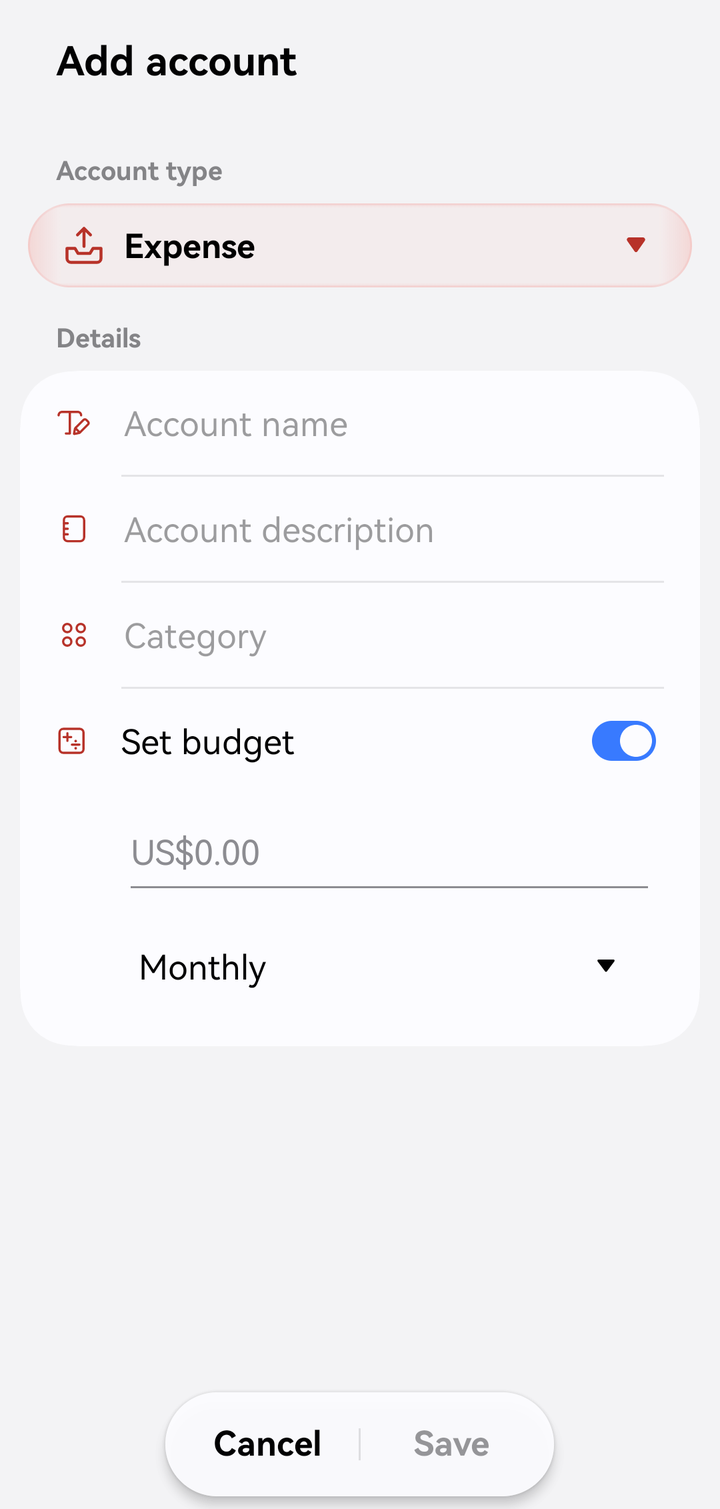
A monthly budget on an expense account
Edit, deactivate or delete
Tap an account to edit it. Tap the list button (☰) next to it to see its transactions.
- Active / Inactive: "Inactive accounts can't be used for new transactions. Their balances still appear in reports." Use this for accounts you've closed.
- Delete: ⋮ › Delete in the account editor.
- To act on several at once, touch and hold an account in the list, then Deactivate, Activate, Change category or Delete.
Special accounts
- A Credit card account (in the Credit card category) can track statements and due dates. See Credit cards.
- A Mortgage loan or Other loans account can track a repayment schedule. See Loans.
- Asset accounts can be linked to savings goals.